Be Careful How You Use Yoast Internal Linking Suggestions
You might wonder why I am saying Be Careful How You Use Yoast Internal Linking Suggestions and I would like to go on to qualify that here.
Yoast Plugin Lightning Fast Internal Linking Suggestions
This has been introduced in the premium version of the Yoast SEO plugin and it seems to work very well indeed.
Optimizing WordPress Settings for Enhanced Performance and SEO
It is only on the premium paid for version and not on the free version and you will see the panel on the right hand side when you are in Posts or Pages in the WordPress Admin area.
It takes a scan of your website and suggests other pages and posts that relate to the subject you are writing on, so as you can link to those pages from within the text.
Google Loves Proper Internal Linking
This should give a great SEO boost to any website if implemented properly and will be far better than just using a Related Posts plugin or worse still, a plugin that uses auto-linking.
Recommended Reading


A Related Posts plugin will not always give the best related post for your reader and auto-linking can use the same anchor text over and over again on posts and pages which will look “spammy” to Google.
So Why the Warning of Be Careful How You Use Yoast Internal Linking Suggestions?
I want you to look at this a bit closer to see what I have discovered!
Don’t get me wrong, I love the Yoast SEO Plugin and wouldn’t use anything else for SEO, but you need to be careful how you use this new feature.
This section of my website is about SEO and of course, Yoast Internal Linking tells me that I should link to my SEO page, which I have done in this sentence.
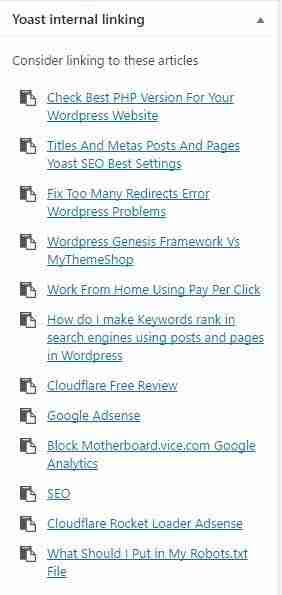
If I now click on the “Text” version of this page, the following is the coding for the SEO link:
<a href=”https://www.brianhillier.co.uk/seo/” >SEO</a>
If you use the Yoast link code, it will have their website name in the coding as well.
This code is going to appear in every internal link I place on my website using Yoast Internal Linking, so if I link maybe 4 times in an article and say I have 1000 pages or posts……..that’s a lot of promotion for yoast-link-suggestion from just one website.
Now multiply that up by all the other websites using their plugin!
Please note that it no longer needs a link to an external website to help it rang, but even a mention can give it a small boost.
The Solution?
What I have done is to go ahead and use the links and coding Yoast suggest BUT, when I am finished, then I use a plugin called Search & Replace by Inpsyde GmbH to search for and replace it with nothing!
This works well and saves my websites leaking lots of free promotion to Yoast’s Internal Linking.
Update: I am now using Rank Math SEO plugin which doesn’t have this problem!