How To Delete WordPress Theme Completely
How to delete WordPress Theme completely is a fairly simple operation to do, but I suppose it is only simple if you know how to do it!
There are so many new people starting to use WordPress and finding there way around that I thought it might be useful to throw this brief one in.
Fastest WordPress Themes A Comprehensive Review
Find Out How To Delete WordPress Theme Completely
You need to have an active WordPress theme and you should not try to delete all themes in your administration area.
When you first install WordPress, it will automatically install free themes for you if you choose. Themes like Twenty Nineteen, Twenty Twenty, Twenty Twenty-one, etc.
You can use any of these free themes already installed or upload your own free or paid theme as well.
What is not a good idea is to have redundant themes sitting in your admin area doing nothing, but taking up space and maybe also exposing you to security vulnerabilities too.
Delete WordPress Themes
Login to your Admin area and click on Appearance and then Themes. You will clearly see what themes you have there. It will also show you the theme that is currently active and that you are using.
Decide which theme you want to keep and make sure it is live.
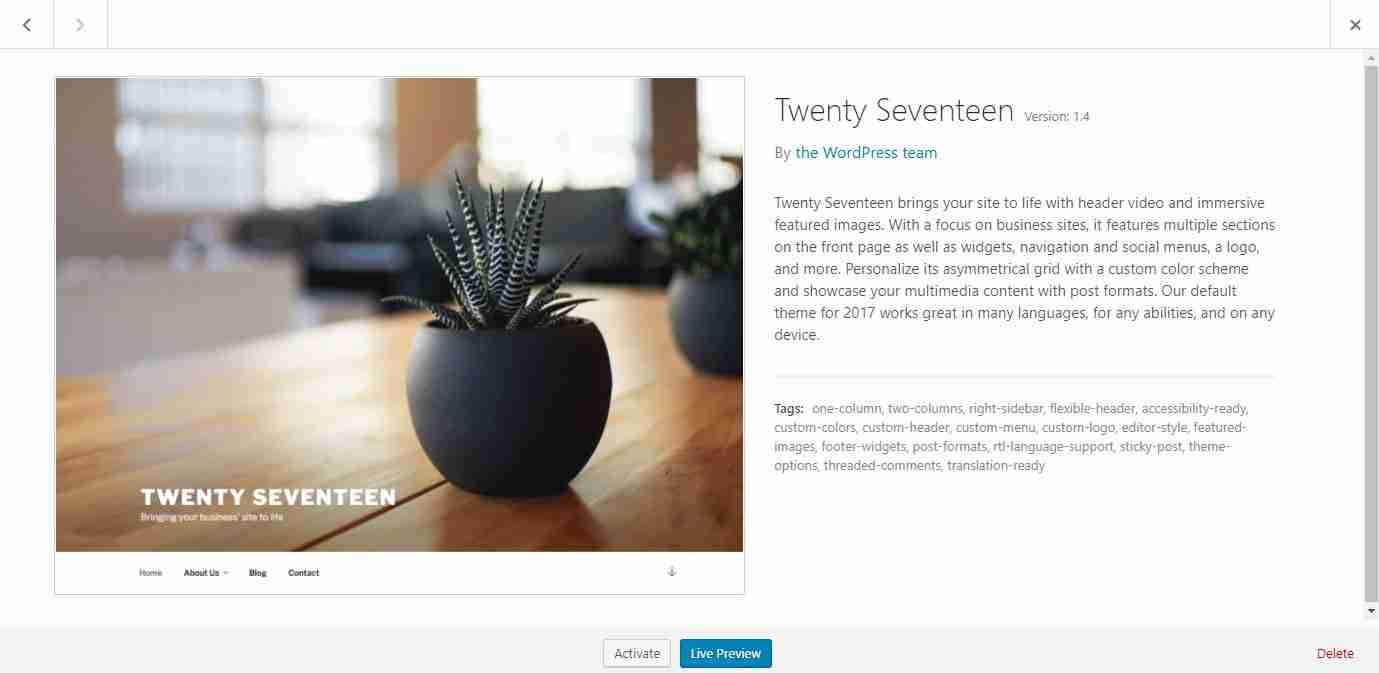
On the other themes you are not using, hover over the theme picture near the centre and click on Theme Details. On the extreme bottom right you will see Delete and it is just a matter of clicking on this once and then clicking on Ok to remove the theme completely.
Didn’t I tell you it would be easy?
See also how to get your pages indexed by Google.